

Allgemein - TCMS-Registrierung schlägt fehl
Dieser Artikel beschreibt mögliche Ursachen und Lösungsansätze für den Fall, dass sich ein oder mehrere Clients nicht am TCMS-Server registrieren können.
TCMS-Registrierung schlägt mit Fehler "reason: Forbidden" fehl
Problembeschreibung
Bei der Registrierung eines RangeeOS-Clients am TCMS erscheint die Fehlermeldung *"reason: Forbidden"*:
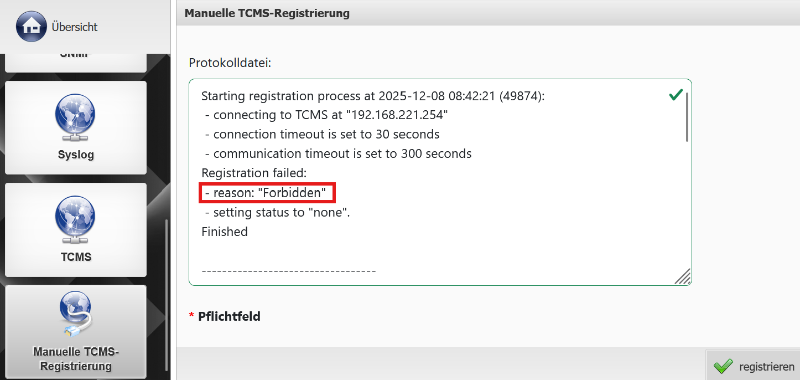
Diese Meldung weist darauf hin, dass der Client vom TCMS abgewiesen wurde. In der Praxis kommen dafür hauptsächlich zwei Ursachen infrage.
Mögliche Ursachen und Lösungen
1. Einschränkung durch Subnetz-Konfiguration
In der Kommbox des TCMS finden Sie unter Remote-Administration die Option „Erlaube Zugriff aus Subnetzen“.
Sind hier ein oder mehrere Subnetze definiert, dürfen sich ausschließlich Clients registrieren, deren Subnetz in dieser Liste explizit eingetragen ist.
Lösung:
- Öffnen Sie die Kommbox des TCMS.
- Navigieren Sie zu Remote-Administration.
- Fügen Sie unter „Erlaube Zugriff aus Subnetzen“ das Subnetz der betroffenen Clients hinzu oder entfernen Sie alle bestehenden Einträge.
- Speichern Sie die Einstellungen.
- Starten Sie das TCMS neu.
2. Fehlerhafte Firmware-Version des TCMS (13.00 Build 121)
Bei Nutzung der Firmware 13.00 Build 121 kann es zu Problemen kommen, wenn sich Clients über den zusätzlichen API-Port registrieren sollen.
In diesem Build wurde der Zugriff auf den API-Port fehlerhaft blockiert, was zur Meldung *„Forbidden“* führt.
Lösung:
- Aktualisieren Sie das TCMS auf eine aktuelle Firmware-Version, in der dieses Problem behoben ist.
- Folgen Sie dabei unbedingt der offiziellen Update-Anleitung:
TCMS – Upgrade bzw. Update des TCMS