

VLC - Video oder Bildershow auf dem Client ablegen und in Dauerschleife spielen
Sie können das RangeeOS problemlos als zur Wiedergabe eines Videos in Dauerschleife nutzen. Hierzu benötigen Sie die Softwaremodule "VLC" und "scripts". Sollten Sie auf die entsprechenden Softwaremodule noch keinen Zugriff haben, wenden Sie sich bitte an unseren Support per:
- E-Mail: support@rangee.com
- Supportformular: https://rangee.com/support/
Video- Bilddateien bereitstellen
Die Video- bzw. Bilddateien können Sie über verschiedene Wege über die Kommbox unter Peripherie -> Konfiguration der Laufwerkszuordnung bereitstellen:
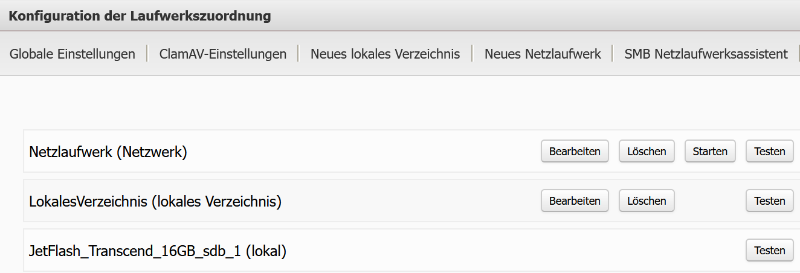
Ansicht Konfiguration der Laufwerkszuordnung mit angelegten lokalem Laufwerkwerk, Netzlaufwerk und lokalem Verzeichnis
- Über einen mit dem Thin Client Verbundenen Datenträger (USB-Stick/SD-Karte)
- Insofern Sie unter den Globalen Einstellungen die Option "Automatisches Einbinden von lokalen Laufwerken" aktiviert haben, müssen Sie nichts weiter tun. Falls Sie diese Option deaktiviert haben, können Sie ein lokales Laufwerk auch direkt über die dann zur Verfügung stehende Option Neues lokales Laufwerk einrichten
- Über ein Netzlaufwerk:
- Wählen Sie hierzu entweder die Option Neues Netzlaufwerk oder SMB Netzlaufwerksassistent aus und tragen Sie die entsprechenden Daten zu Ihrem Netzlaufwerk ein
- Drücken Sie nach dem Übernehmen der Einstellung noch die Schaltfläche Start neben dem neu erschienenen Eintrag
- Über ein lokales Verzeichnis direkt am Thin Client:
- Legen Sie über die Schaltfläche
Neues lokales Verzeichnis
einen Ordner an. Sie können für diesen Ordner wahlweise eine FTP oder SMB-Freigabe aktivieren um anschließend das Video hochzuladen. Zur Nutzung der FTP Freigabe muss in den
Globalen Einstellungen
die Option "FTP Server aktivieren" gesetzt sein. Für die Verwendung von SMB die Option "Samba (Windows-Freigaben) aktivieren".
- Legen Sie über die Schaltfläche
Neues lokales Verzeichnis
einen Ordner an. Sie können für diesen Ordner wahlweise eine FTP oder SMB-Freigabe aktivieren um anschließend das Video hochzuladen. Zur Nutzung der FTP Freigabe muss in den
Globalen Einstellungen
die Option "FTP Server aktivieren" gesetzt sein. Für die Verwendung von SMB die Option "Samba (Windows-Freigaben) aktivieren".
VLC-Verbindung mit Kommandozeilenoptionen starten
Navigieren Sie zu Werkzeuge -> Skripte und legen Sie eine Neue Verbindung an.
Tragen Sie unter "Skript" diese Zeilen entsprechend Ihrer Umgebung ein (Entfernen Sie nicht nicht benötigte Beispielzeilen):
#Link VLC Profile in passenden Ordner - nicht löschen
ln -sf /mnt/config/vlc/config ~/.config/vlc

#Beispiel 1: Starte VLC im Fullscreen mit Loop und ohne Titelanzeige
vlc --fullscreen --no-osd --no-video-title -q --qt-continue --loop /mnt/shares/all/#NamederFreigabe#/#Namedes Videos#

#Beispiel 2: Starte eine Bildershow aller Dateien im Verzeichnis im Fullscreen mit Loop
vlc --fullscreen --no-osd --no-video-title -q --qt-continue --loop --image-duration=60 /mnt/shares/all/#NamederFreigabe#/*
Ersetzen Sie hier noch:
- #NamederFreigabe# | durch den von Ihnen gewählten bzw. in der Konfiguration der Laufwerkszuordnung angezeigten Laufwerksnamen.
- #Namedes Videos# | Name/Pfad zur Videodatei auf dem Datenträger
Die restlichen Optionen sind frei wählbar. Sinnvoll ist hier in den meisten Fällen noch die Option "Autostart aktivieren" oder "Bei Verbindungsende: Erneut verbinden"
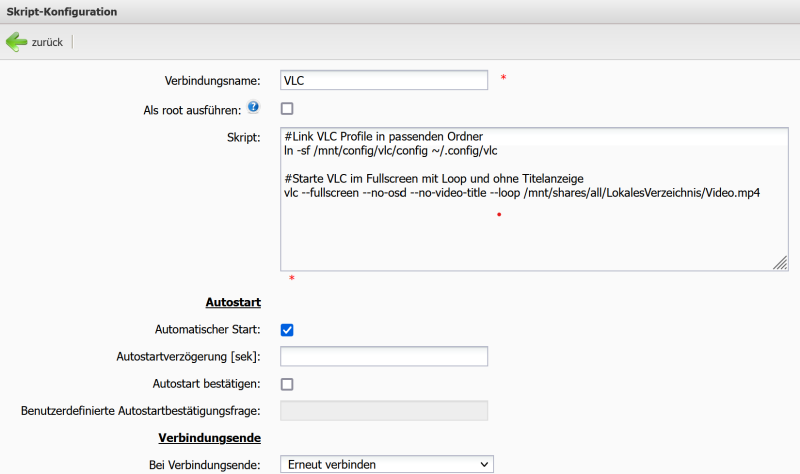
Beispiel einer VLC-Skript Verbindungsdefinition